
Indoor workout player for your smart trainer
We are happy to share that RestOrTrain now has its own indoor workout player. It is free for every account on iPhone and Android.
It already plans your season and week and builds your workouts. Now you can ride them in the same app, with ERG controlling the watts and nothing to export or import.
Start a workout from your calendar
Open a planned cycling workout and tap Start on indoor trainer below the workout notes. Choose your trainer from the devices in range. It needs Bluetooth FTMS, the standard that lets an app control resistance. A Bluetooth heart-rate strap is optional. The app remembers your devices and reconnects next time.
Your planned sessions are already on the calendar, so there is no workout library to browse. For another session, ask in chat for "5 x 3 minutes at 350 W". The workout appears in your calendar, ready to ride.
Change the effort during a ride
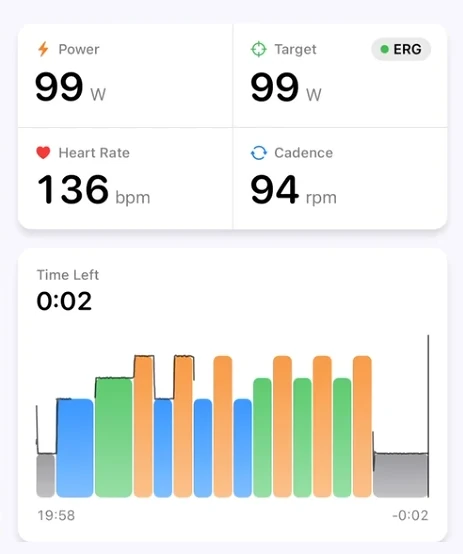
With ERG on, the trainer adjusts resistance to match the target without you changing gears. You can see your power, target, heart rate and cadence, plus the workout notes. The chart shows the whole workout, the time left in this step and the next step.
Minus and plus change all targets by 1% per tap, including recoveries, for the rest of the ride. The range is 50% to 150% of the planned targets. With ERG on, the trainer follows immediately.
Between minus and plus are previous step, pause or play, and next step. Previous restarts the current step; tap it within the first three seconds to go back one step.
The ERG button beside the target lets you turn ERG off and shift gears yourself. It stays off on later rides until you turn it back on.
Save your ride and check the intervals
Pause to open Workout Paused, with Save Ride and Resume. At the end, Workout Complete offers Save Ride or Keep Riding. Keep Riding continues at the last step's watts and counts the extra time. Nothing is saved until you tap Save Ride.
The saved ride appears in your calendar with one lap per workout interval. It can get a title and short description. If it matches that day's planned workout, it can also get a Workout Score out of 100 with the reason. Ask in chat how each interval went.
You can still send planned workouts to other platforms for free.
Frequently asked questions
Why is Start on indoor trainer missing?
The button appears only on cycling workouts with a power target on every step.
Can I change today's workout before starting?
Yes. Tell it your legs feel heavy. It uses your synced sleep, HRV and resting heart rate alongside training load to propose a change. Approve it, then open the workout once the update appears in your calendar.
Can I lock my phone during a ride?
Yes. The ride continues with your phone locked or while you use another app.
Are there virtual worlds or group rides?
No. You can still ride your planned workouts in Zwift, where they appear on the home screen on their scheduled day.
RestOrTrain plans your season and puts today's session on your trainer or Garmin.
A few questions a month are free.


Published October 8, 2026, updated October 10, 2026